

Net 30 and Net 60 on Shopify: Setting Up B2B Payment Terms Without the Chaos


B2B growth often comes with a hidden cost. You end up acting as a bank for your customers. Offering credit is standard practice, but the reality is harsh. Industry data shows that while average B2B payment terms are 30 days, a staggering 47% of invoices are paid late. For growing merchants, that bad debt can cripple cash flow.
Setting up net payment terms on Shopify is a critical step in streamlining your B2B checkout experience. However, simply toggling "payment due later" in your admin dashboard does not guarantee you will see that money on time. You need a frictionless system that connects the order to your customer's Accounts Payable department.
In this guide, we break down how to configure Shopify's deferred payments and bridge the dangerous invoicing gap that causes delays. We will also share practical strategies to automate reminders so you can stop chasing payments and focus on scaling.
Let's get started.
I. Overview of B2B Deferred Payments

Mastering deferred payments requires balancing customer acquisition with healthy working capital.
1. What Are Net Terms on Shopify?
Deferred payments allow B2B buyers to purchase inventory now and pay for it later. This is a foundational element of the wholesale ecosystem. Shopify natively supports standard credit terms directly in the admin dashboard. You can assign Net 30, Net 45, Net 60, and Net 90 terms to approved clients.
When a vetted customer logs into your Shopify B2B portal, they experience a frictionless checkout. Instead of entering credit card details, they simply select "pay later" based on their pre-approved terms. The system records the order, deducts the inventory, and starts the countdown to the payment due date automatically.
2. The Working Capital Reality
Offering credit terms acts as a powerful marketing tool. Wholesale buyers actively seek out suppliers who provide Net 30 or Net 60 terms because it improves their own cash flow. They can sell the inventory before they actually have to pay you for it.
This creates a serious tension for your business. Net 30 terms can be dangerous for growing merchants with tight working capital constraints. You still have to pay your manufacturers, cover shipping costs, and handle payroll while waiting a month or more for customer payments to arrive. Balancing this risk requires strict internal processes and clear payment expectations.
3. The Dangerous "Invoicing Gap"
Here is the biggest hidden trap in B2B eCommerce. Shopify perfectly tracks the payment term status internally. However, B2B customers require a legal, tax-compliant PDF invoice to initiate their internal Accounts Payable process.
Buyers simply will not process payments without a physical or digital document matching their official Purchase Order (PO). When Shopify generates an order confirmation email without a proper commercial invoice attached, an "invoicing gap" occurs. This missing link increases time-to-payment and creates massive friction. To fix this gap, many merchants review the top 5 Shopify invoice apps for B2B and wholesale businesses: a comparative review to find the right automation tool for their store.
II. 6 Strategies to Manage Orders with Deferred Payments
Managing B2B orders requires a mix of proper native setup and smart automation. You need this combination to ensure consistency and professionalism across your entire wholesale channel.
1. Configure Terms in Company Profiles
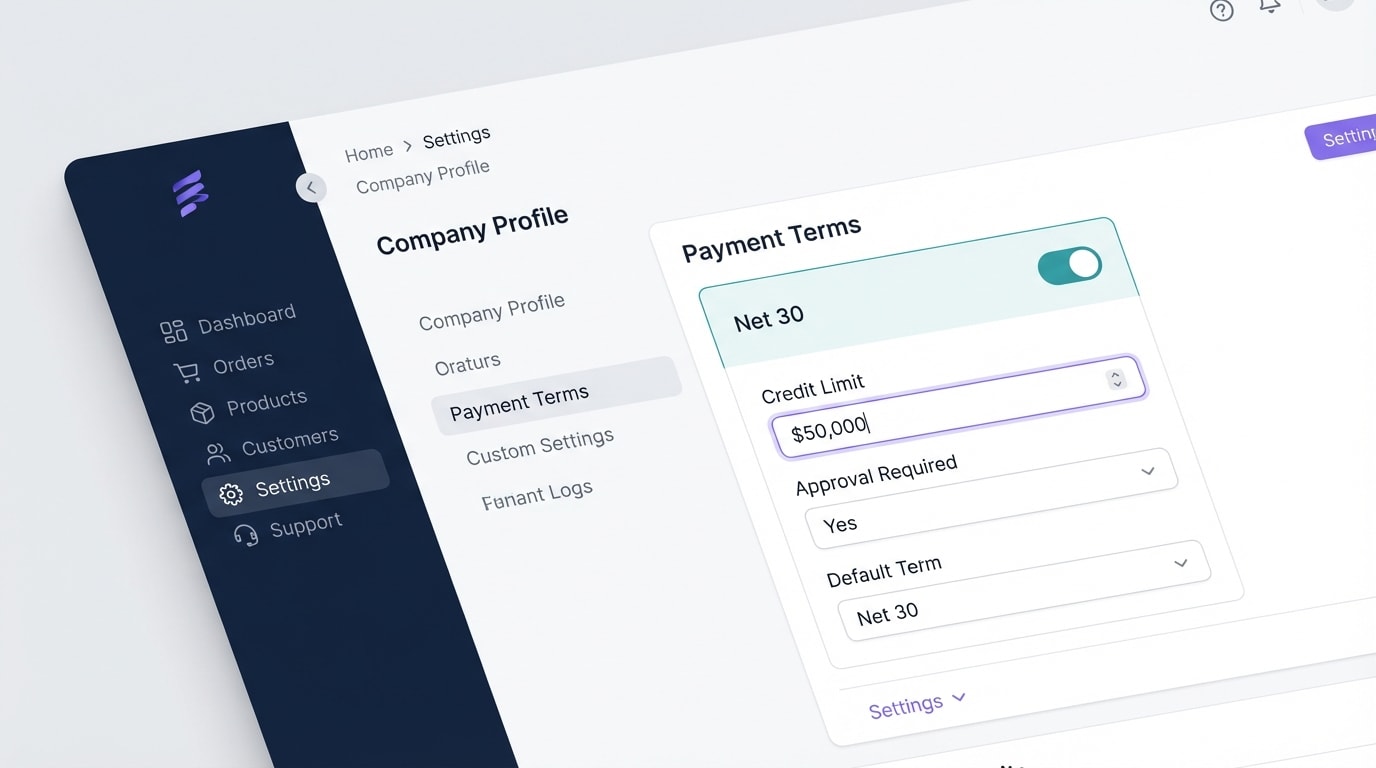
Assign specific payment terms directly to vetted B2B company profiles.
Start by mapping out which customers deserve which terms.
Why this matters: Not all buyers should get the same credit leash. Organizing terms at the Company Profile level ensures a personalized, secure checkout experience for every buyer.
Here's how to implement it:
- Navigate to B2B Customers: Open your Shopify Admin and access your B2B Company settings.
- Assign Native Options: Select from the standard Net 30, 45, 60, or 90 options based on the client's specific agreement.
- Utilize Draft Orders: For custom negotiations, manually set payment due dates on Draft Orders before sending the invoice link to the buyer.
Securing this at the profile level guarantees the checkout automatically adapts to the customer's approved credit limit.
2. Bridge the Gap with Automated PDF Invoicing
When a B2B buyer checks out with Net 30 terms, the clock starts immediately. But their accounting department needs a document, not just a standard Shopify order confirmation.
Why this matters: Professional B2B invoicing is the absolute secret to getting paid on time. Inconsistency between Shopify order data and the buyer's required paperwork leads to ignored payment due dates. Once you read about the benefits of using an invoice generator for B2B businesses, you will see how crucial this step is for your cash flow.
Here's how to implement it:
- Install an Automation Tool: Use the Fordeer PDF Invoice Generator to automatically create legal, tax-compliant invoices the second an order is placed.
- Include PO Numbers: Ensure the invoice template automatically pulls in the buyer's Purchase Order number via Shopify Metafields.
- Set Clear Due Dates: Visually highlight the specific date the deferred payment is expected on the document.
3. Automate the "Thank You + Invoice" Flow
Do not rely on manual emails to deliver your paperwork.
Why this matters: Automating the immediate delivery of the invoice reduces support tickets asking about payment dates. It gets you into the customer's payment queue much faster.
Here's how to implement it:
- Trigger on Order Creation: Set up a flow that triggers immediately when a B2B order with net terms is finalized.
- Attach the PDF: Send a branded email thanking them for the order, with the Fordeer-generated PDF attached directly to the message.
- Include Payment Links: Make sure the email contains a direct link back to the Shopify checkout so they can easily settle the invoice when the time comes.
Pro Tip: Set up an automated reminder sequence to trigger 5 days before the invoice is due, and 1 day after it is late. Proactive communication drops late payment rates significantly.
4. Restrict Payment Methods for Net Orders
Sometimes you want to control exactly how a deferred payment is eventually settled.
Why this matters: Processing large wholesale orders via credit card eats into your margins due to high transaction fees. You want to keep those profits in your pocket.
Here's how to implement it:
- Use Shopify Plus Features: If you are on Plus, utilize the Payment Customization API.
- Hide Credit Cards: Write a simple GraphQL script to hide credit card options at checkout specifically when Net Terms are applied to the order.
- Encourage Bank Transfers: Force high-value B2B orders to be settled via ACH, wire transfer, or Shopify Balance to preserve your profit margins.
5. Leverage Draft Orders for Partial Payments
Not every B2B relationship starts with a full Net 60 credit line.
Why this matters: Taking a partial upfront payment mitigates risk while still offering flexibility for the remaining balance. This is perfect for new wholesale relationships.
Here's how to implement it:
- Create the Draft: Build the wholesale order manually in your admin dashboard.
- Collect the Deposit: Send an invoice requiring a 30% or 50% immediate payment to initiate the production or shipping process.
- Set the Balance Term: Once the deposit is paid, adjust the remaining balance to a Shopify payment due later status (like Net 30) for the rest of the bill.
6. Sync with Your Accounting Software
Your Shopify store does not exist in a vacuum. It needs to talk to your books constantly.
Why this matters: Manually reconciling deferred payments in QuickBooks or Xero leads to costly data entry errors and mismatched Accounts Receivable data.
Here's how to implement it:
- Integrate Directly: Ensure your Shopify store is synced tightly with your accounting platform.
- Map Payment Statuses: Map the "Payment Pending" status in Shopify to "Accounts Receivable" in QuickBooks.
- Reconcile Payouts: When the Net 30 payment is finally captured, ensure the integration automatically marks the corresponding PDF invoice as "Paid" across both systems.
III. Other Things to Keep in Mind: Risk Management

Protecting your cash flow means knowing who to trust with deferred payments.
Before you start assigning Net 60 terms to every wholesale account, you need a defense strategy. Remember, 47% of B2B invoices are paid late. You have to protect your business.
1. Vetting B2B Customers Thoroughly
Never offer credit terms on a very first order. You need to perform a Customer Credit Risk Assessment first. Use tools like Dun & Bradstreet to verify their business history. Always request trade references and run business credit checks before activating native payment terms inside their Shopify Company Profile.
2. Implement the "Hybrid" Model
Introduce a tiered approach to wholesale credit. Keep all new wholesalers on "Due on Receipt" terms until they hit a specific, proven threshold. For example, require a $5,000 lifetime spend before offering credit. Gradually transition them to Net 15, and eventually Net 30, only as they consistently prove their reliability.
3. Establish Firm Dunning Protocols
Dunning is the process of methodically communicating with customers to ensure the collection of accounts receivable. Outline a strict timeline for your team. Send a gentle email at 3 days late. Make a phone call at 15 days late. Temporarily revoke their Shopify checkout privileges at 30 days late. Having professional PDF invoices on hand makes these difficult conversations objective and factual.
IV. Conclusion
Managing net payment terms on Shopify does not have to result in cash flow anxiety. By combining Shopify's native B2B checkout features with smart risk management, you can offer the flexibility your wholesale buyers demand without acting like an unsecured bank.
The real secret lies in bridging the invoicing gap. When you automate the delivery of professional, tax-compliant PDF invoices the moment an order is placed, you align perfectly with your buyer's AP department. This dramatically reduces late payments and administrative headaches.
Ready to stop chasing invoices and start scaling your B2B sales? You've got this.
Follow the Fordeer Team for more useful updates!
- Install Fordeer Apps for Free
- Get immediate assistance by chatting with us
- Join Fordeer Commerce Community for fresh app updates, expert tips, and private deals.

